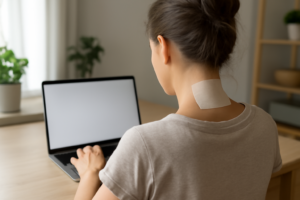


Add up how much time you actually spend looking at a screen in a given day — phone, laptop, TV — and for a lot of people it’s genuinely most of their waking hours. “Tech neck” isn’t a cute made-up term; it’s a real, specific loading pattern your cervical spine wasn’t built for, and it may be a bigger driver of your migraines than any of your usual suspected triggers. Let’s look specifically at how screen habits create this pattern, and what a genuine reversal routine looks like.
What “Tech Neck” Actually Does to Your Cervical Spine
Phones make this worse than desktop screens, and it’s worth understanding why. When you look at a laptop or monitor, your head tilts forward maybe 15 to 20 degrees. When you look down at a phone in your lap or on a desk, that angle can hit 45 to 60 degrees — nearly straight down. The load your neck muscles have to support scales dramatically with that angle, and most people spend far more cumulative hours a day in the phone position than they realize, checking messages in short bursts that add up.
Unlike a single bad posture moment, tech neck is a repetitive-strain pattern — dozens or hundreds of short forward-flexion episodes throughout the day, each one small, none of them dramatic on its own. That’s exactly why it’s so easy to under-blame for migraines: there’s no single moment where you’d point and say “that’s what caused it.” It’s cumulative, which means the fix has to be cumulative too.
Where Tech Neck Shows Up in Your Day
- Phone checking, dozens of times a day. Each glance down might only last 30 seconds, but multiplied by 60-plus checks, that’s real cumulative time in a high-load position.
- Laptop use on a couch or in bed. Without an external monitor at eye level, laptop screens sit low by design, which pulls your head down and forward for however long you’re working from that position.
- Scrolling in bed before sleep. This combines the worst of both — poor neck angle right before the hours your cervical spine is supposed to be recovering.
- Video calls on a low-mounted webcam. If your camera sits below eye level, you’re likely tilting down toward the screen for the entire call without noticing.
A Reversal Routine, Not Just a Posture Reminder
Telling yourself to “sit up straight” doesn’t hold up against dozens of daily phone checks — you need structural changes to the habit itself, plus active decompression to undo the accumulated strain.
- Raise your phone instead of lowering your head. Bringing the device up toward eye level, even partway, cuts the flexion angle significantly compared to looking straight down.
- Use an external monitor and keyboard for any laptop session over 20 minutes. Couch and bed laptop use is the single worst offender on this list because there’s no easy way to raise the screen.
- Set a hard cutoff for in-bed scrolling. Even 10 fewer minutes of forward-flexed scrolling right before sleep adds up over weeks.
- Decompress at the end of the day, not just stretch. Because tech neck is cumulative loading, a passive decompression tool at day’s end counteracts hours of accumulated forward strain more directly than a quick stretch can.
The Cervical Traction Tool That Actually Addresses Neck Tension—Not Just Masking It
Given how much of tech neck is cumulative loading from screen habits you can’t fully eliminate (some phone use and video calls are unavoidable), an end-of-day decompression tool matters more here than it would for other causes of neck-driven migraines. The RESTCLOUD Neck and Shoulder Relaxer cradles your cervical spine in a way that mimics gentle traction, directly counteracting the forward-flexion loading pattern screens create.
What works
- The contoured design supports the cervical curve instead of flattening it, which means it’s working against — not with — the forward head posture that hours of screen time created.
- This tool provides passive support for 10–15 minutes at a time, which most users report produces noticeable neck relief within the first week of consistent end-of-day use.
- It’s a one-time purchase that works anywhere (desk, couch, bed), so it’s realistic to actually use daily after a screen-heavy day rather than something you have to remember to schedule.
What doesn’t
- This is a support tool, not a cure — it doesn’t reduce your screen time or fix a low-mounted webcam; you still need the habit changes above or the pattern just reloads the next day.
- It takes 10–15 minutes of consistent daily use to see lasting results; people expecting instant migraine relief from a two-minute session will be disappointed.
Think of this as reversing the day’s cumulative screen-time loading each evening — it’s not a replacement for raising your phone and screens, but it undoes what you couldn’t avoid.
About This Article

Written by Michael Torres. Michael Torres has had joint problems his whole life — hypermobile as a kid, chronic sprains and a dislocating shoulder through his twenties, an osteoarthritis diagnosis in his early fifties, and a right knee replacement since. He is not a doctor or a physical therapist and has no clinical training. He writes about what has helped him and what he has watched help the people around him, and says plainly when he has not tried something himself. More about this site.
Scope and limits. Michael has no medical or clinical training — he writes about living with his own joint pain, not about treating anyone else's. Nothing here is medical advice. Talk to a doctor before starting anything new, and get seen promptly for pain that is new, severe, worsening, or comes with swelling, fever, or numbness.
Verify this against a primary source
Specifics change, and your situation may differ from the one described here. These are the authorities worth checking directly:
- NIAMS — arthritis and musculoskeletal research from the NIH
- MedlinePlus — plain-language medical reference from the NIH
- Arthritis Foundation — condition guides and treatment overviews