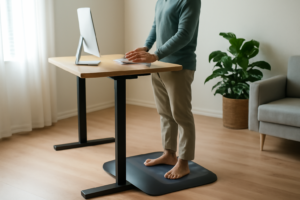


You know that dull ache in your wrists after a long day of typing? Or the stiffness in your knees that creeps in around 3 PM when you’ve barely left your chair? If you’ve nodded along to either of those, you’re in good company. So many of us spend eight or more hours a day at a desk without giving a second thought to what that’s doing to our joints — until something starts to hurt. That’s exactly why joint protection at work is something I wish more people talked about before the discomfort becomes a daily problem.
As someone who’s spent years learning about musculoskeletal health and talking with people about their everyday pain patterns, I can tell you this: most workplace joint issues don’t happen because of one dramatic moment. They build slowly, rep by rep, hour by hour, through repetitive movements, awkward positions, and setups that just weren’t designed with your body in mind. The good news? Small, intentional changes can make a real difference.
Why Your Desk Job May Be Harder on Your Joints Than You Think
Here’s something that surprises a lot of people: sitting still is actually quite demanding on your joints. When you’re seated for extended periods, especially in a position that isn’t well-supported, your hips, knees, ankles, and lumbar spine absorb a lot of sustained pressure. Add in a keyboard and mouse that put your wrists at awkward angles, and you’ve got a recipe for cumulative strain.
Research suggests that prolonged static postures and repetitive upper-limb movements — like typing and mousing — are associated with increased risk of musculoskeletal discomfort in the wrists, shoulders, and neck. This doesn’t mean your desk job is destroying you, but it does mean your setup matters more than most people realize.
A few key problem areas I see come up again and again:
- Wrists and hands: Typing with bent or elevated wrists puts repetitive strain on the tendons and small joints of the hand.
- Knees and hips: Feet that don’t rest comfortably flat can create uneven pressure through the knee joint and hip flexors over time.
- Neck and shoulders: A monitor that’s too low or too far away pulls you into a forward head posture that stresses the cervical spine and shoulder joints.
Practical Joint Protection at Work: Where to Start
You don’t need to overhaul your entire office overnight. In my experience, the people who stick with ergonomic improvements are the ones who start with one or two targeted changes rather than trying to do everything at once. Here’s where I’d focus first:
The Wrist Rest That Actually Prevents Typing Pain Before It Starts
Wrist strain from typing is one of the most preventable joint problems at work — but only if you catch it early, before inflammation and repetitive stress start stacking up. A proper wrist rest pad supports your forearm in a neutral position and takes the constant micro-flexing pressure off your wrist joint and tendons, which is exactly where most desk workers develop problems.
What works
- Keeps your wrist in a neutral (slightly extended) position rather than bent down toward the keyboard — this reduces strain on the flexor tendons and carpal tunnel structures that get irritated by hours of typing.
- The memory foam material holds up over months of use without flattening out the way cheap gel pads do, so you’re not replacing it every few weeks and redoing your ergonomic setup.
- Works best as prevention: people who use a wrist rest from day one (or when discomfort first appears) typically avoid the escalation to actual wrist pain or carpal tunnel symptoms.
What doesn’t
- If you already have carpal tunnel or tendinitis, a wrist rest alone isn’t enough — you need to combine it with breaks, stretching, and possibly anti-inflammatory approaches; a pad won’t reverse established inflammation.
- Results depend on actually using it consistently and positioning your keyboard correctly; I’ve seen people buy a rest pad, then still type with their wrist bent and wonder why nothing improved.
This is a “prevention and early intervention” tool, not a cure for existing wrist problems — which is why it works best if you start using it before pain becomes chronic. Check out the MOSISO Wrist Rest Support for Mouse Pad & Keyboard Set to set up your workspace right.
About This Article

Written by Michael Torres. Michael Torres has had joint problems his whole life — hypermobile as a kid, chronic sprains and a dislocating shoulder through his twenties, an osteoarthritis diagnosis in his early fifties, and a right knee replacement since. He is not a doctor or a physical therapist and has no clinical training. He writes about what has helped him and what he has watched help the people around him, and says plainly when he has not tried something himself. More about this site.
Scope and limits. Michael has no medical or clinical training — he writes about living with his own joint pain, not about treating anyone else's. Nothing here is medical advice. Talk to a doctor before starting anything new, and get seen promptly for pain that is new, severe, worsening, or comes with swelling, fever, or numbness.
Verify this against a primary source
Specifics change, and your situation may differ from the one described here. These are the authorities worth checking directly:
- NIAMS — arthritis and musculoskeletal research from the NIH
- MedlinePlus — plain-language medical reference from the NIH
- Arthritis Foundation — condition guides and treatment overviews