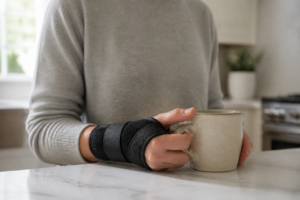


You know that moment when you reach for your coffee mug and your wrist just… protests? That dull ache that starts somewhere around 2 p.m., creeps up your forearm, and by the end of the workday has turned into something you can’t ignore anymore? I lived that cycle for almost two years before I finally got serious about finding real wrist support for typing pain. If that scenario sounds familiar, you’re in the right place — and I promise this isn’t just another list of vague tips you’ve already googled.
Why Typing Hurts More Than You Think It Should
Here’s something most people don’t realize: the average office worker types somewhere between 40 and 60 words per minute for hours at a stretch. That means your wrists are making thousands of small repetitive movements every single day, often in positions that place real stress on the tendons, joints, and the narrow carpal tunnel through which your median nerve passes. Research suggests that prolonged wrist extension — that slight bend upward that happens when your keyboard is too high or you’re resting your wrists while actively typing — can increase pressure inside the carpal tunnel significantly. Over time, that pressure may contribute to inflammation, nerve irritation, and the kind of nagging pain that makes you dread Monday mornings.
The tricky part is that wrist discomfort from typing rarely announces itself dramatically. It usually starts as mild fatigue, a little stiffness in the morning, maybe some tingling in your fingers. A lot of people brush it off for months before they connect it to their workstation setup. I was one of those people. I kept assuming I had just slept funny or worked out too hard — right up until I started noticing the same ache every single workday without fail.
The Ergonomic Setup Changes That Actually Made a Difference
Before we talk products, I want to be clear about something: no wrist rest in the world will fully compensate for a fundamentally awkward workstation. The gear helps — and it genuinely does help — but the foundation matters first. Here’s what I changed before anything else:
- Keyboard height: Your keyboard should sit at a height where your elbows are at roughly 90 degrees and your forearms are roughly parallel to the floor. If your desk is too high, a keyboard tray can be a game-changer.
- Wrist position while typing: Many people don’t realize that wrist rests are meant to be used during pauses — not while actively striking keys. While typing, your wrists should float slightly above the surface. The rest is for breaks between bursts of typing.
- Monitor height: This one surprised me. When your screen is too low, you hunch forward — and that posture travels all the way down to your wrists. Raising my monitor to eye level made a noticeable difference in how my whole upper body felt.
- Micro-breaks: I started using a simple rule — every 25 to 30 minutes, I stop typing, shake out my hands, and do a few gentle wrist circles. It sounds small, but many people find this kind of periodic movement makes a real difference in how their wrists feel by end of day.
Once I had those fundamentals in place, adding the right wrist support tools took things from manageable to genuinely comfortable.
Wrist Support for Typing Pain: Products I Actually Recommend
I’ve tried more wrist rests than I care to admit. Some were too firm, some went flat after a few weeks, and a few made things worse by positioning my wrists at an odd angle. The options below are ones that I believe offer real ergonomic value — and the feedback from users with similar complaints backs that up.
The Wrist Rest That Actually Supports Neutral Position (Not Just Cushioning)
The problem with most wrist rests is they’re just soft — they don’t actually prevent your wrist from bending into the exact posture that created the pain in the first place. A proper wrist rest needs firm, supportive padding that keeps your wrist neutral while you type, which is where this one earns its place in my setup.
What works
- The gel-memory foam maintains its shape and doesn’t compress flat after a few months like cheaper alternatives — it actually keeps your wrist elevated at the right angle consistently.
- The enlarged size means your whole palm and forearm get support, not just your wrist, which distributes pressure better and reduces that nagging ache that creeps up into your forearm by afternoon.
- Research on neutral wrist positioning during typing shows it reduces strain on the flexor tendons — this rest actually enforces that position rather than letting your wrist collapse forward.
What doesn’t
- It won’t fix underlying issues like keyboard height, monitor position, or chair setup — this is ONE piece of the ergonomic puzzle, not a standalone solution.
- It takes about 2-3 weeks of consistent use before your wrist pain actually starts improving; if you’re looking for immediate relief, you need to address acute inflammation first with ice or rest.
This isn’t a magical fix — your wrist position matters more than any single product — but a quality rest that keeps your wrist neutral while you work is foundational to preventing pain from coming back. Gimars Upgrade Enlarge Silky and Superfine Fabric Gel Memory Foam Keyboard Wrist Rest Set
About This Article

Written by Michael Torres. Michael Torres has had joint problems his whole life — hypermobile as a kid, chronic sprains and a dislocating shoulder through his twenties, an osteoarthritis diagnosis in his early fifties, and a right knee replacement since. He is not a doctor or a physical therapist and has no clinical training. He writes about what has helped him and what he has watched help the people around him, and says plainly when he has not tried something himself. More about this site.
Scope and limits. Michael has no medical or clinical training — he writes about living with his own joint pain, not about treating anyone else's. Nothing here is medical advice. Talk to a doctor before starting anything new, and get seen promptly for pain that is new, severe, worsening, or comes with swelling, fever, or numbness.
Verify this against a primary source
Specifics change, and your situation may differ from the one described here. These are the authorities worth checking directly:
- NIAMS — arthritis and musculoskeletal research from the NIH
- MedlinePlus — plain-language medical reference from the NIH
- Arthritis Foundation — condition guides and treatment overviews